Excel VBA (Visual Basic for Applications) macros are developed to automate repetitive tasks, create customized functionalities, and improve efficiency within the Excel application. It allows the users to create automated, complex workflows (i.e. processing data, formatting reports, performing calculations, interacting with the operating system to support the automation), which reduce manual workload and minimizes human error.
Excel VBA macros are able to interact with operating systems by utilizing the host computers application’s object model and, or for more complex tasks, calling directly low-level system functions.
Lifetime deal · Unlimited Plan
🚀🚀🚀🚀🚀 The toolstack behind the scenes of 10,000+ Successful Content Creators
Create, transform, and publish content across all platforms with one click. Save 20+ hours per week and never struggle with content creation again.

You get access to the full content engine — for less than the cost of 1 month on any other tool. Confidently trusted by 10,000+ Creators. Claim Your Special Deal Right Now! Click Here Now!
The Requirement
I often have to create folders and many of them during the course of any project. I end up with many folders. Many folders are not created equally because I am not that consistent.
Getting the folders created at the beginning of the project is helpful in efficiency and organization.
To meet this requirement, I have a few choices before me.
1.) Create the folders I need manually by clicking new folder and typing the name in.
– This is subject to data entry errors on my part.
– This is subject to inconsistencies between different projects.
– This could lead to misplaced or missing data.
– Production Stall – Leads to taking more time than necessary to locate something which should be readily available and accessible, thus holding up the project as the clock runs.
2.) Create a macro that creates all the necessary folders in milliseconds accurately and consistently.
– Less typing and minimal data entry errors on my part.
– I save time on every project.
– I may change my folder structure in one place for future updates and project requirements.
– Scalability: Whether it is 1 folder or 1000, they get created fast and I can focus on other more important things.
The Benefits Of Excel VBA Macros
Excel VBA macros are able to interact with operating systems by utilizing the host computers application’s object model and, or for more complex tasks, calling directly low-level system functions. It could be sending a series of emails, taking screen shots, capturing data, moving files, opening webpages, creating directories etc.
Introducing DirTool1
I created this tool to make managing the file folders more easier to deal with.
It has a list of functions relating to the type of task or project I am doing.
Read & Copy the Sub-Folders of a Folder (to my clipboard)
Folder Creation – Music
Folder Creation – Video
Folder Creation – Automation
New Folder Creation
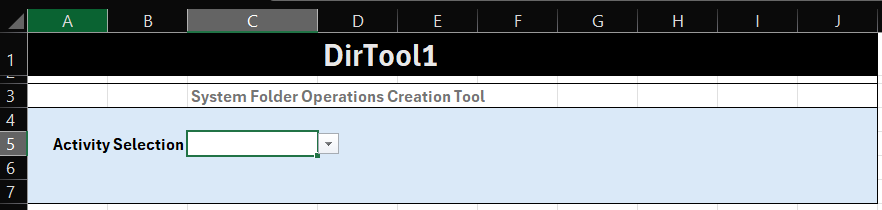
Consists of 4 separate macros using 2 public variables, a dictionary, a temporary sheet. The dictionary and the temporary sheets are hidden. The dictionary list the operations and folders to be created.A variable is passed regarding the type of project to make it possible to make it work with less redundant Excel VBA code.

Below, the folder should stay hidden unless being updated. The FolderList becomes visible during the process of getting the data into the clipboard

Our Code
The first part is a WorkSheet_Change event is triggered by one of the menu items.
Option Explicit
'Excel VBA Code by techtinktronics.net All rights reserved.
Private Sub Worksheet_Change(ByVal Target As Range)
    ' Only trigger if a single cell in Column A (1) is changed
    If Target.Column = 3 And Target.Cells.Count = 5 Then
        Application.EnableEvents = False ' Prevent infinite loops
     End If
        ' run the code with the selection

    If Target.Value = "Read & Copy the Sub-Folders of a Folder" Then
    SelectFolder1
            rfc1x
    Sheet1.Activate
    Range("C5").ClearContents
        Else
   ' Exit Sub
    End If

    If Target.Value = "New Folder Creation" Then
            SelectFolder1
            CreateUserFoldernfc1
    Sheet1.Activate
    Range("C5").ClearContents
        Else
   ' Exit Sub
    End If

    If Target.Value = "Folder Creation - Music" Then
    SelectFolder1
    selectedCode = "D"
            CreateFoldersFromColumn1
    Range("C5").ClearContents
    Exit Sub
    End If

    If Target.Value = "Folder Creation - Video" Then
    SelectFolder1
    selectedCode = "E"
            CreateFoldersFromColumn1
    Range("C5").ClearContents
    Exit Sub
    End If
    If Target.Value = "Folder Creation - Automation" Then
    SelectFolder1
    selectedCode = "F"
        CreateFoldersFromColumn1
    Range("C5").ClearContents
    Exit Sub
        End If

Application.EnableEvents = True

End Sub
The next part is the folder selection that takes the folder we select as a global variable.
Option Explicit
Public selectedPath As String
Public selectedCode As String

Sub SelectFolder1()
'Excel VBA Code by techtinktronics.net
    Dim folderPicker As FileDialog

    ' Initialize the Folder Picker dialog
    Set folderPicker = Application.FileDialog(msoFileDialogFolderPicker)

    With folderPicker
        .Title = "Select a Target Folder" ' Custom window title
        .AllowMultiSelect = False         ' Only allow one folder selection
        .InitialFileName = Application.DefaultFilePath ' Set starting location

        ' Show the dialog; if user clicks OK (-1), capture path
        If .Show = -1 Then
            selectedPath = .SelectedItems(1)
            ' Ensure path ends with a backslash for future use
            If Right(selectedPath, 1) <> "\" Then selectedPath = selectedPath & "\"
            MsgBox "You selected: " & selectedPath
        Else
            MsgBox "Selection Cancelled by user."
        End If
    End With
End Sub
This code is for creating a single folder, usually used for the main folder of the project.
Sub CreateUserFoldernfc1()

'Excel VBA Code by techtinktronics.net
    Application.EnableEvents = False
    Dim folderName As String
    Dim fullPath As String

    ' 1. Ask for the folder name
    folderName = InputBox("Enter the name of the new folder:", "Create Folder")

    ' Exit if the user cancels or enters nothing
    If folderName = "" Then Exit Sub

    ' Define the full path (using the current workbook's location)
    fullPath = selectedPath & "\" & folderName

    ' 2. Check if the folder exists using the Dir function
    ' vbDirectory attribute ensures we are looking for a folder
    If Dir(fullPath, vbDirectory) = "" Then
        ' 3. Create the folder if it does not exist
        MkDir fullPath
        MsgBox "Folder created successfully at: " & fullPath, vbInformation
    Else
        MsgBox "Folder already exists.", vbExclamation
    End If
    Application.EnableEvents = True
End Sub
This code runs a for loop with a couple of if statements to check for empty cells and duplicate folders.
Sub CreateFoldersFromColumn1()
'Excel VBA Code by techtinktronics.net
    Dim ws As Worksheet
    Dim lastRow As Long
    Dim i As Long
    Dim folderPath As String
    Dim newFolder As String

    Set ws = ThisWorkbook.Sheets("Data") ' Change to your sheet name
    folderPath = selectedPath

    ' Find the last row with data in the specified column
    lastRow = ws.Cells(ws.Rows.Count, selectedCode).End(xlUp).Row

    For i = 2 To lastRow ' Starting at row 2 to skip headers
        newFolder = folderPath & ws.Cells(i, selectedCode).Value

        ' Check if cell is not empty and folder does not already exist
        If ws.Cells(i, selectedCode).Value <> "" Then
            If Dir(newFolder, vbDirectory) = "" Then
                MkDir newFolder
            End If
        End If
    Next i

    MsgBox "Folders created successfully!", vbInformation
End Sub


Did you know that websites can potentially identify visitors through IP addresses, cookies, and browser fingerprinting? Did you know that your ISP can see all the activities you do online as they track all your activities?
The fact is websites and apps use different technologies to collect information about what you do online. What can you do about this? Protect your privacy with a VPN, not just any VPN, Surfshark VPN. Surfshark VPN is a high-security, user-friendly virtual private network service known for allowing unlimited simultaneous device connections. It encrypts internet traffic to protect user privacy, bypassing geo-restrictions for streaming, and offers advanced features like MultiHop, ad-blocking, and a strict no-logs policy, making it a top-tier, affordable security tool.

PRW Digital Services – Digital Services Done Right – Have a project, need help, inquire within.


